
How do you test a network cable?
To test a network cable: connect both ends to your tester. For a basic continuity check, use a cable verifier, which confirms wire map (all 8 conductors connected correctly) and shorts. For ISO/IEC 11801 performance certification, use a Level IV or Level V field tester (such as a Fluke DSX), which measures wire map, length, attenuation, NEXT, return loss, and other parameters, and issues a PASS or FAIL against the cable standard (Cat5e, Cat6, Cat6A). Only a certified field tester produces records valid for 25-year warranty registration.
How to Test a Network Cable: Step-by-Step Guide for Installers
Testing a network cable correctly depends on what you need the test to tell you. A basic continuity check verifies that the cable is physically connected, but it cannot confirm whether the installed channel meets the performance standard required by the project specification. This guide covers both approaches and explains when each is appropriate.
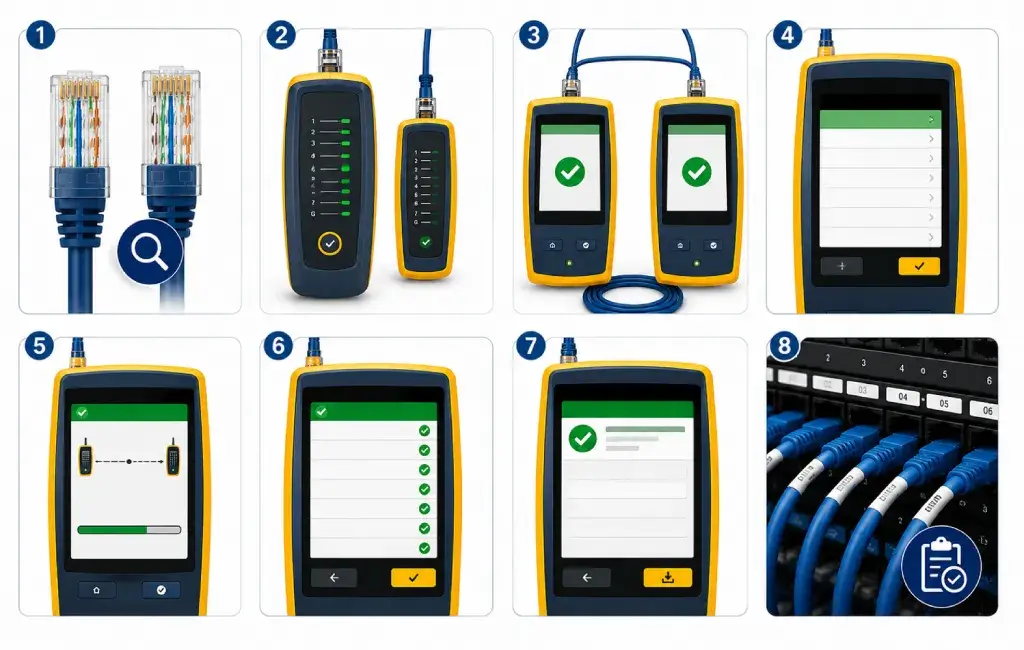
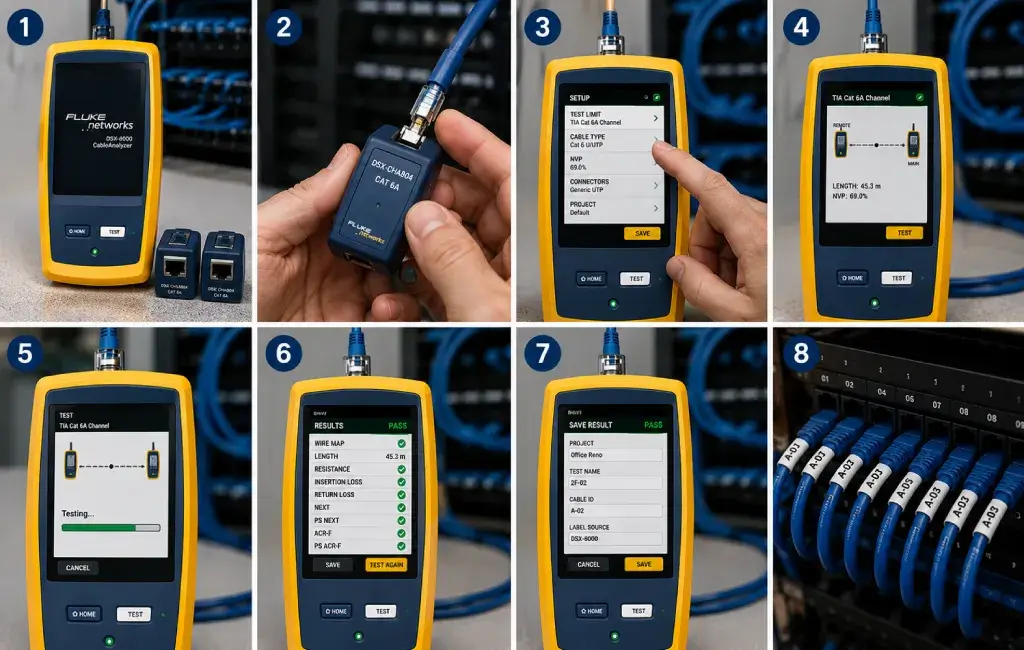
What You Need Before Testing
- 1 The correct tester for your test type (see below)
- 2 Both ends of the cable accessible: connect at the patch panel end and at the outlet end
- 3 Equipment disconnected from both ends. Do not test live circuits
- 4 The cable standard being tested (Cat5e, Cat6, or Cat6A), needed to select the correct test limits on a field tester
- 5 The cable's Nominal Velocity of Propagation (NVP), available in the CNET cable datasheet, for accurate length readings
Method 1: Basic Continuity Check (Cable Verifier)
Use a cable verifier (also called a cable checker or wire mapper) for a quick connectivity check. This method confirms physical connections but does not certify performance. A cable verifier PASS result confirms physical connectivity only, and does not confirm that the cable meets Cat6 or any other performance standard.
- Plug the remote unit into the far end of the cable (outlet end)
- Plug the main unit into the near end (patch panel or switch end)
- Switch the main unit on. The verifier sends a signal through each of the 8 conductors in sequence
- Read the indicator LEDs or display: conductors 1 to 8 should light in sequence (T568A or T568B pattern)
- If a conductor is open (not lighting), there is a break or missed IDC termination at one end. Re-terminate the suspect end
- If conductors light out of sequence, there is a crossed or split pair. Re-terminate to the correct wiring standard
- If two conductors light simultaneously, there is a short. Inspect the cable for damage and re-terminate
Method 2: ISO/IEC 11801 Certification (Field Tester)
Use a Level IV or Level V certified field tester (such as the Fluke DSX-600, DSX-5000, or DSX-8000) for performance certification. For background on how these testers work, see Fluke Networks' cable testing overview. This is the required method for all commercial structured cabling projects, project warranty registration, and handover documentation.
- Set the test limit on the field tester to match the installed cable standard: Cat6 (Class E) or Cat6A (Class EA)
- Enter the cable NVP value (from the CNET datasheet) in the tester settings, as this affects length accuracy
- Connect the field tester main unit to the patch panel end and the remote unit to the outlet end using the appropriate test adapters
- Press TEST. The tester runs wire map, length, insertion loss, NEXT, FEXT, return loss, propagation delay, and delay skew automatically
- Review the PASS or FAIL result: any FAIL on any parameter means the channel does not meet the specified standard
- For FAILs, identify the failing parameter, diagnose the cause (see fault table below), remedy, and re-test
- On PASS, save the test record with the outlet ID, date, tester serial number, and the standard tested
- Repeat for every outlet: one record per channel
- Export records from the tester software (e.g. Fluke LinkWare Live) for project documentation and warranty submission
What the Results Mean
| Parameter | What It Measures | Common Failure Cause |
|---|---|---|
| Wire map | All 8 conductors connected correctly, no opens, shorts, crossed or split pairs | Termination error: wrong pair position, missing IDC seating |
| Length | Channel length via TDR, must be under 100 m | Run exceeds 100 m, or wrong NVP setting |
| Insertion loss | Signal attenuation across full bandwidth | Excessive run length, tight bends, PoE bundle heat |
| NEXT | Crosstalk between pairs at the near end, the strongest noise source | Pair untwist too long at IDC (over 13 mm) |
| Return loss | Impedance mismatch and signal reflection | Damaged cable, wrong connector, kinked sections |
| Delay skew | Timing difference between fastest and slowest pair | Wrong cable category, damaged pair geometry |
Frequently Asked Questions
-
Do I need a special tool to test network cable?
For basic connectivity, a cable verifier costs EUR 50 to 200 and is sufficient. For ISO/IEC 11801 performance certification, required for commercial projects and warranty registration, a Level IV or Level V calibrated field tester is required. These cost EUR 3,000 to 8,000+ and need annual factory calibration. Many installers hire field testers per project rather than purchasing. -
Can I test a network cable with a multimeter?
A multimeter can check DC continuity and basic shorts, but it cannot perform wire map testing (identifying which conductor connects to which pin at both ends), length measurement, or any of the RF performance parameters (NEXT, insertion loss, return loss). A multimeter test is not accepted as evidence of cable compliance for any structured cabling standard. -
How do I know if my network cable is faulty?
Signs of a faulty network cable include no link light on the connected device, a slow or unreliable network connection, intermittent disconnection, or a FAIL result on a wire map or continuity test. For commercial installations, a certified field tester is the definitive diagnostic tool, as it identifies exactly which parameter is failing and at what frequency or pair. -
How long does it take to test network cable?
A field tester performs a full Cat6 certification test on a single channel in approximately 10 to 15 seconds. Setting up (connecting adapters, labelling outlets, saving records) adds time. Experienced installers typically test 30 to 50 channels per hour for a well-labelled installation, including record saving. -
What test records do I need for the CNET 25-year warranty?
One PASS test record per installed channel, tested to the correct ISO/IEC 11801 class (Class E for Cat6, Class EA for Cat6A), using a calibrated Level IV or V field tester. Records must include the outlet ID, test date, tester model and serial number, and the PASS result. Records are submitted to CNET at project completion via the warranty registration process.
Need Help with Testing or Warranty Registration?
CNET's technical team supports certified installers through the testing and warranty registration process. Contact us for assistance with test record formats, NVP values, or warranty submissions.
CNET Cat6 and Cat6A cable is available from many electrical wholesalers throughout Ireland, and through CNET certified installer partners.